

Agent integration
Three surfaces are for coding agents more than for people: a paste-ready orientation brief, a bounded evidence bundle for one task, and durable annotations an agent writes back to the graph. Use them when you want an agent oriented before it greps, and when you want it to remember a judgment between sessions.
Two related surfaces have their own pages: the brief injected at the start of a Claude Code session (session brief), and the skill that decides which questions reach these tools at all (the routing skill).
| Tool | CLI | Answers |
|---|---|---|
export_agent_brief | export-agent-brief | Markdown orientation to paste into a memory file. |
architecture_context | architecture-context | A bounded evidence bundle for one coding task. |
annotate_component | annotate-component | Record a durable judgment on a component. |
list_annotations | list-annotations | Read those judgments back. |
The server also exposes two MCP surfaces with no CLI equivalent: per-project resources at knossos://<project_id>/summary, /boundaries and /brief (the first two JSON, the last the markdown export_agent_brief renders), and the orient and review_diff prompts. resources/list returns 100 projects per page, oldest first; pass its nextCursor back as cursor to read the next page. A project scanned, added or removed between pages does not shift the others. Every field of every tool is in the MCP tool reference.
Refreshing a stale graph
Most read tools accept refresh_if_stale, which defaults to true. A call that lands on a stale graph rescans before it answers, so the agent skips the round trip of reading a staleness banner, calling scan_project and asking again. A tool's entry in the MCP tool reference says whether it takes the argument. architecture_context does not, and passing it there is rejected as an unknown argument.
The rescan runs only when it fits inside the call you are already waiting on. A project whose own scan history estimates more than a 5000 ms budget gets the stored graph and a warning that names scan_project as the next step. Set KNOSSOS_AUTO_REFRESH=0 on the server process to turn the default off everywhere; only the literal 0 does. An explicit refresh_if_stale argument wins over both the default and the switch, so false returns the stored graph as stored. The budget and the warning's shape are in response envelopes.
A rescan writes Knossos's own graph and starts language workers, so these tools carry readOnlyHint: false and a client that confirms write tools will confirm here. Pass refresh_if_stale: false for a call that is read-only. The annotation details are in response envelopes.
Agent brief
export_agent_brief renders a compact, deterministic markdown orientation brief from the graph, sized to paste into a CLAUDE.md or AGENTS.md section. A future agent session starts oriented on the codebase with zero tool calls, because the essentials sit in the project's own memory file.
What it renders
Sections are appended in a fixed priority order:
- Head: project name, the scan's timestamp, file, component and relationship counts, and the language mix. Always included.
- Boundaries: the ten largest explicit or inferred boundaries by member count.
- Entry points: up to twelve routes, commands and controller or command components, where execution starts. Test-role components are excluded, because a command stub in a test file is no way into the system. The session brief asks the same question of the same graph, with the same predicate.
- Key hubs (most depended-on): the five highest-degree components from
architecture_health's filtered hub ranking. Test-role and external or unresolved components are left out, so the ranking can be trusted at a glance. - Framework signals: the detected framework roles among Laravel, Livewire, Symfony, Django, FastAPI, Flask, Next.js, NestJS, React and Vue.
- Closing pointer: a one-line reminder to rescan, and which live tools to call next (
scan_project, thenarchitecture_summary,impact_analysisorexplain_flow). Always included.
A section with no data is skipped silently and is not reported as omitted.
Budget and omitted sections
max_chars (1000–20000, default 4000) is a hard bound: the markdown is never longer. Sections are appended in the order above while they fit. A section that would push the brief over budget is dropped whole, never cut mid-list, and its name lands in omitted_sections. The head caps its language list at five entries and folds the rest into a +N more suffix. When even the head and the closing pointer exceed max_chars, every section is omitted and the head is truncated, so the pointer back to the live tools is never lost.
The response data shape is:
{
    "markdown": "# Fixture Shop: architecture brief\n...",
    "omitted_sections": ["framework_signals"],
    "max_chars": 4000
}
Invocations
knossos export-agent-brief project_... --max-chars=4000 --out=AGENTS.md--out=FILE writes the markdown to a file, and --json prints the full envelope instead. The MCP form takes project_id and max_chars, plus refresh_if_stale.
Run it after a scan and paste the result, or write it with --out, into the project's memory file. The brief reflects the last scan and no later edit, so regenerate it after significant structural changes. For anything current, call the live tools its closing line names.
Architecture context
architecture_context loads just enough context for one coding task in a single call. It assembles a deterministic, bounded bundle of the project summary, likely location, explicit changed-file impact and a few component dossiers, without executing target-project code.
Supply a task description (up to 2000 characters), up to 50 changed files, or both:
{
    "project_id": "project_...",
    "task_description": "add checkout refund support",
    "files": ["src/Checkout.php"],
    "max_chars": 30000
}
The equivalent CLI command is:
knossos architecture-context project_... src/Checkout.php \
  --task="add checkout refund support" --max-chars=30000 --json
max_chars runs from 4000 to 100000 and defaults to 30000. It is split across the summary, location, impact and dossier sections. Each section reports whether it was included, truncated, not_requested or omitted to protect the total, and the response reports the serialized size and the allocation. verbosity is compact (the default, evidence trimmed to a preview) or full.
Ranking is static and deterministic. The bundle is evidence for navigation and review, and no proof of runtime behavior; dynamic dispatch and generated code can stay unresolved.
Source snippets
Set include_source: true, or --include-source on the CLI, to inline a code window of at most 40 lines for each included dossier's primary evidence location, as a sibling snippet key. A snippet is either {status: 'included', path, start_line, end_line, code} or {status: 'unavailable', reason}. The reasons are no_line_evidence, outside_project_root_or_missing, missing_or_oversized, unreadable and stale_line_evidence, the last when the recorded line range no longer exists.
Snippets are read from the working tree at query time and come from no scan, so they drift from the graph's evidence when you have edited since. They count against the dossier section's budget, so a large section can still be truncated under max_chars.
This is the one query path that reads project source. It uses the scan's root guard and degrades to unavailable where a scan would fail, and it never needs write access.
Creation brief
creation_brief (CLI: knossos creation-brief <path|project-id> <file>) says what a file about to be created should look like. It takes a project and a path that need not exist, relative to the project root or absolute under it, and reads only what the last scan stored, so the same graph gives the same answer and git is never run.
data holds placement (the most specific declared boundary the path lands in, and the boundaries that one or any declared boundary containing it may not use), neighbours (at most three existing files to copy from), conventions (each with the number of files that follow it, shown only when the folder has at least five files of that kind and four in five follow it, nine in ten for a type the files use or inject), test (the path the folder's own pattern expects for the new file's test, with how many of the folder's files have theirs there, when three in five do), goes_with (the files that changed in four in five of the commits that added a file there), gates (the checks in knossos.json that apply to the path, with their commands), notes (how many notes sit on the neighbours and the boundary) and a signature that ignores counts and neighbours. A folder with fewer than five files of the path's extension and role learns from the nearest folder, its own or an ancestor, whose whole subtree holds five: basis has subtree: true and the brief reads here (across <folder> and below), or here (across the project) for the root. Across a subtree only the suffix and the file-name case are stated: what a folder's own files share in declaration kinds, modifiers, used and injected types and line counts does not carry over to a new folder. Without a knossos.json that can be read, placement and gates are empty and a warning carries the loader's message. The CLI prints the brief as text, at most 14 lines and 1,200 characters, or the envelope with --json. The text is cut from the bottom, with two lines kept through the cut: on a stale graph, graph is behind (scanned 2h ago): ... with the files changed since, and, when the gate commands do not fit, the gate names with a pointer to the gates list in knossos.json. A path that names a directory, the project root included, is refused, and a companion whose file has been deleted is not named.
Before creating a file
Call creation_brief before you write a new file. For a PHP file in src/Query/ of this repository it prints the following, with the last line shortened:
knossos · new file in ns:Query
may not use: ns:Cli, ns:Mcp, php-worker, python-worker, rust-worker, tests, tooling, typescript-worker
like: src/Query/ArchitectureContextService.php, src/Query/AgentBriefService.php, src/Query/ReviewDiffService.php
here: 97 of 99 one class per file · 96 of 99 final · median 166 lines, largest 924
gates: cs · phpstan · docblocks · file-length · lint-files · reference · mutation-pins. Run: vendor/bin/php-cs-fixer fix; vendor/bin/phpstan analyse --memory-limit=1G src; ...
The gates come from the gates key of knossos.json: each has a name, a command of at most 300 characters and an optional applies_to list of globs (at most ten) over project-relative paths. A gate without applies_to covers every path, and * crosses /, so src/* covers src/Query/A.php. A project may declare up to 20 gates.
The session brief shows the same gates when a session starts, in every state whose folder can be read, because they come from knossos.json and not from the graph: a stale graph or a folder that was never scanned still shows them. Up to five gates are listed with their commands. With more, the block is three lines: the heading, every gate name in declared order, and a pointer to the gates list in knossos.json or to creation_brief for one path. A project that declares none gets one line naming the scripts found in its composer.json and package.json.
Component annotations
Use annotate_component to record a durable judgment on a component and list_annotations to read it back. Annotations are the one part of the graph that comes from a person or an agent and not from a scan. A person reads and writes them in the pane: see notes on components. A note shows on its component's detail there, under the blast radius:
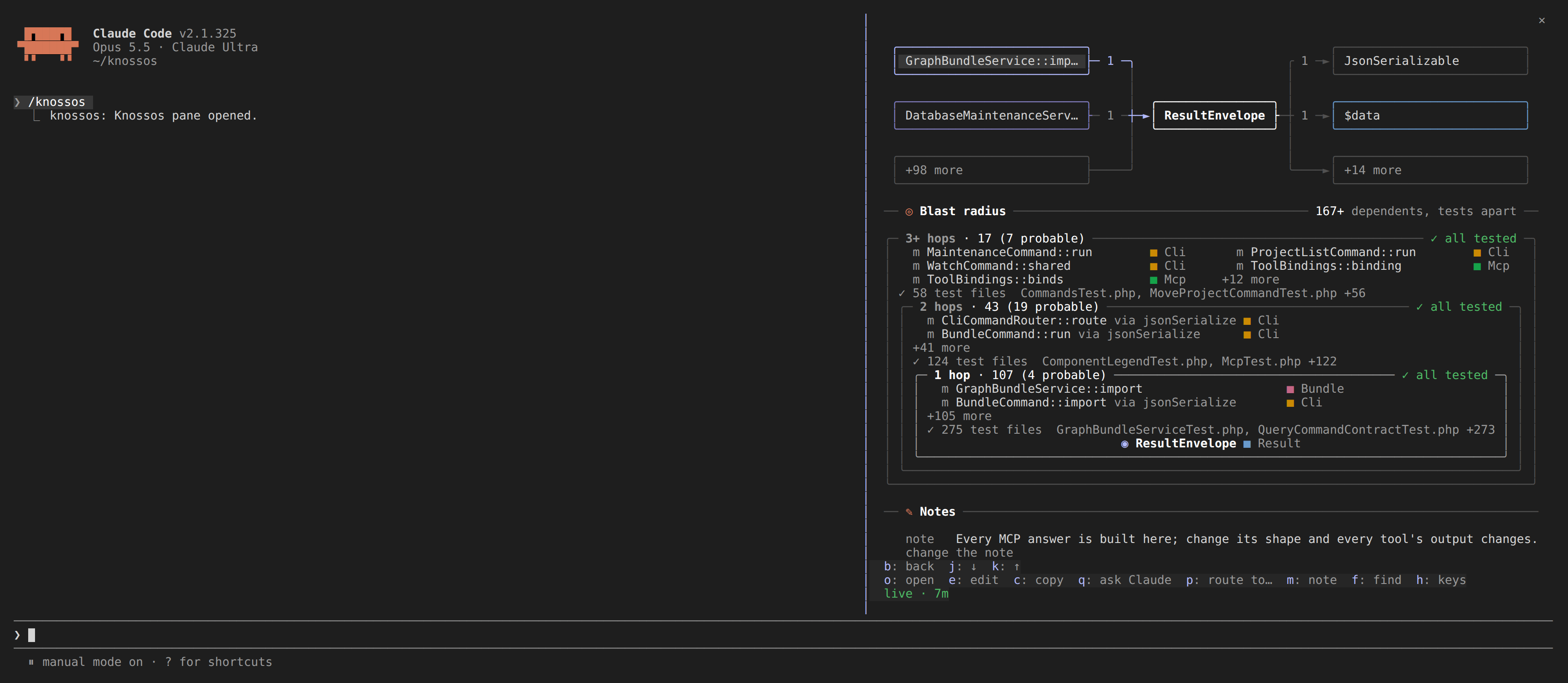
Every annotation records its author. A note written in the pane is the person's (user); one written through annotate_component or the annotate-component command is the model's (model), since an agent can run either. Both can annotate the same component with the same kind without overwriting each other. A model writes, extends and removes only its own notes, and never changes a person's. Readers list a person's notes first.
Notes come to the agent with the answers they bear on. list_usages, impact_analysis, explain_flow, find_component, file_context and inspect_component add data.notes when the components their result names carry any: each with its component, kind, author, the date it was written, and at most 300 characters of its text (list_annotations has the rest). At most 10 come with one result: a person's first, then in the order the result names the components, so the one asked about leads. A result naming no annotated component has no notes key. Under max_chars, notes are trimmed after evidence and legends and before the findings they annotate.
A model's note is an observation of code that can change under it. Writing it records the content hash of the component's own file and of up to 5 more files the agent names in evidence_paths. When one of them has changed or is gone, the note is stale, with a stale_reason such as written before documents/views.py changed; a note no scanned file backs at all reads rests on no scanned file. A note on a project file no worker reads, by its path, rests on that file: it makes the file a file component at the next scan. A note on a file a worker does scan, by its path, stays on that file. A note that still holds is confirmed with confirm: true (CLI --confirm), which rests it on the files as they are now and keeps its text and its evidence_paths; confirm cannot be combined with value, evidence_paths, remove or replace. Re-recording the note with new text confirms it too, and removing it is the other way out. A person's note is never stale. A note goes stale when its own component's lines change, and not when another part of the same file does. The note records the component's line span and a hash of the span text beside the hash of the whole file, and confirming a note records the spans too. When the file has changed, Knossos finds the component again by name in the active graph and compares its current span. That reads the file from disk, and only when the disk matches the last scan. The whole-file rule still applies to a file over 2 MB, a component no longer in the graph, a disk file that differs from the scan, a note written before spans were recorded, and every file cited in evidence_paths.
A note whose component is gone from the graph is missing. When exactly one component of the same kind and short name was added since a retained snapshot last held the note's component, list_annotations gives that row a suggested_component. With no such snapshot it is null. Suggestions are computed over the rows on the returned page, so a filtered listing can suggest a component that the unfiltered one leaves out as ambiguous. To carry the note over, pass move_to (CLI --move-to) with the component's name:
knossos annotate-component project_... App\\Gone --move-to=App\\Adapter --execute --jsonThe model's own note moves to that component and keeps its text, evidence and created time. It keeps the basis it was written against, so it reads stale when its component's code changed; check it and confirm it. A person's note is never moved this way, and a person's check on the moved note moves with it. move_to is refused when combined with value, evidence_paths, remove, replace or confirm, and for a target that is not in the graph or is the note's own component. The pane's note-move does the same. evidence_paths reads a path as file_context does: project-relative, ./-led, or absolute under the project root. A file no scan reads, such as a CI script or a shell tool, counts too: its hash is read from disk when the note is written and again when it is shown. It must be a regular file under the root, after following any link, and at most 2 MB. Notes sit in their own table, keyed by canonical name and not by node id. component must match exactly: a stable id, a canonical name or a display name. A name that only starts like a component's is recorded as given, with a warning that names the components it might have meant, so an annotation never lands on a different component.
{
    "project_id": "project_...",
    "component": "App\\Checkout",
    "kind": "note",
    "value": "core flow"
}
The equivalent CLI command is:
knossos annotate-component project_... App\\Checkout note "core flow" --execute --json
knossos list-annotations project_... --json
Kinds
kind is one of:
intended_boundary: this component's placement is deliberate.confirmed_dead: a human or agent verified that nothing uses this component, beyond what static analysis can prove.architecture_healthattachesannotation: {kind, value}to that component's dead-code candidate entry, so the judgment shows next to the candidate.false_positive: this component was flagged wrongly.architecture_healthleaves it out of its dead-code candidates and counts it underannotated_false_positives.intentional: the finding is true and meant, such as a route parked on purpose or a helper only tests use by design.architecture_healthleaves it out of its dead-code candidates and counts it underannotated_intentional. On one component,false_positivewins overintentional, which wins overconfirmed_dead.note: a free-form remark. The session brief lists the most recent notes at the start of a session.
false_positive, intentional, confirmed_dead and note change what another tool shows. intended_boundary is recorded and listed, and no tool reads it.
A sixth kind, check, is the person's and only the pane writes it: a request that you look at a component's note again, its value the reason (possibly empty). list_annotations lists it and annotate_component refuses it. Your next note on that component clears it.
Survival across rescans
Every scan rebuilds nodes and everything keyed to a node id, because node ids change between scans. Annotations are keyed by (project_id, canonical_name, kind) and have no foreign key to nodes, so a rescan keeps them. Removing the project cascades the cleanup.
Preview convention
annotate_component previews by default, and execute: true applies it. remove: true deletes the (component, kind) pair. Writing the same pair again is an upsert: the value and updated_at change, created_at stays. The response's previous field holds the annotation as it stood before the write, or null, so a caller can tell an upsert from a fresh insert. A value is a string of at most 2000 characters, like task_description on architecture_context. Both limits count characters, as the schema's maxLength does, so accented or CJK text gets the same room as ASCII. A value is stored as given, surrounding whitespace included.
component resolves like in other tools: an exact canonical or display name, or a unique name prefix. An ambiguous prefix is rejected with the candidates. A name that matches no node is still accepted, with a "not found" warning, because the target may be a symbol the scanner cannot see yet or one a planned change will add.
Reading annotations
list_annotations returns rows ordered by canonical name, then kind, with value, author, created_at and updated_at. Filter by component (an exact canonical name) or kind. limit (1–100, default 100) and offset paginate.
Not exported in graph bundles
export-bundle and import-bundle move a derived graph between databases, and annotations are outside their table list. They are agent-authored state tied to one project's history, so a bundle never carries them.