

Details, routes and the finder
What opens from a row: a component's or a file's detail, its blast radius, a route between two components, the finder, and the diff of a changed file.
A component's detail
o on a component, or /knossos inspect <component>, opens its detail. It heads with the component's name, kind, boundary, file and line. Three cards follow.
Dependencies draws its neighbourhood (the top of the rings still): the component in a box in the middle, what uses it fanning in from the left, what it uses fanning out to the right. Each edge carries how many relationships run along it, and each box is framed in its boundary's colour. Each side shows as many neighbours as the height allows, and the rest as one +87 more box. On a pane too narrow for the three boxes, the users stand above and what it uses below; below 50 columns both sides are tables. The marker walks both sides, users first, and o opens a neighbour as its own detail. Pressing the +87 more box moves the marker onto the nearest neighbour it hides, below the shown ones or above them, when the detail lists one.
Blast radius: see below.
Notes: the annotations recorded on the component, and m to add one. See a note on a component.
p starts a route from it.
A file's detail
A file opens as its detail from Hubs, Changes, Churn, the drifted files, the finder, another file's detail and a click on any file:line. It heads with the file's name, its boundary, its path, language and size.
- Dependencies draws its neighbourhood as a component's is, each file by its name: the ten files that depend on it most, with how many relationships run from each, fanning in; the ten it depends on fanning out; and above them the boundaries a change here reaches.
- Declares lists the components the file declares, the twelve most used, with how many components in other files use each.
- Changed since the session began: the diff, for a file opened from Changes.
The counts leave out the stand-ins for symbols declared outside the project (sprintf, a vendor class), and the module node that stands for the file itself. The band, the notes and Changes count the same way.
The finder
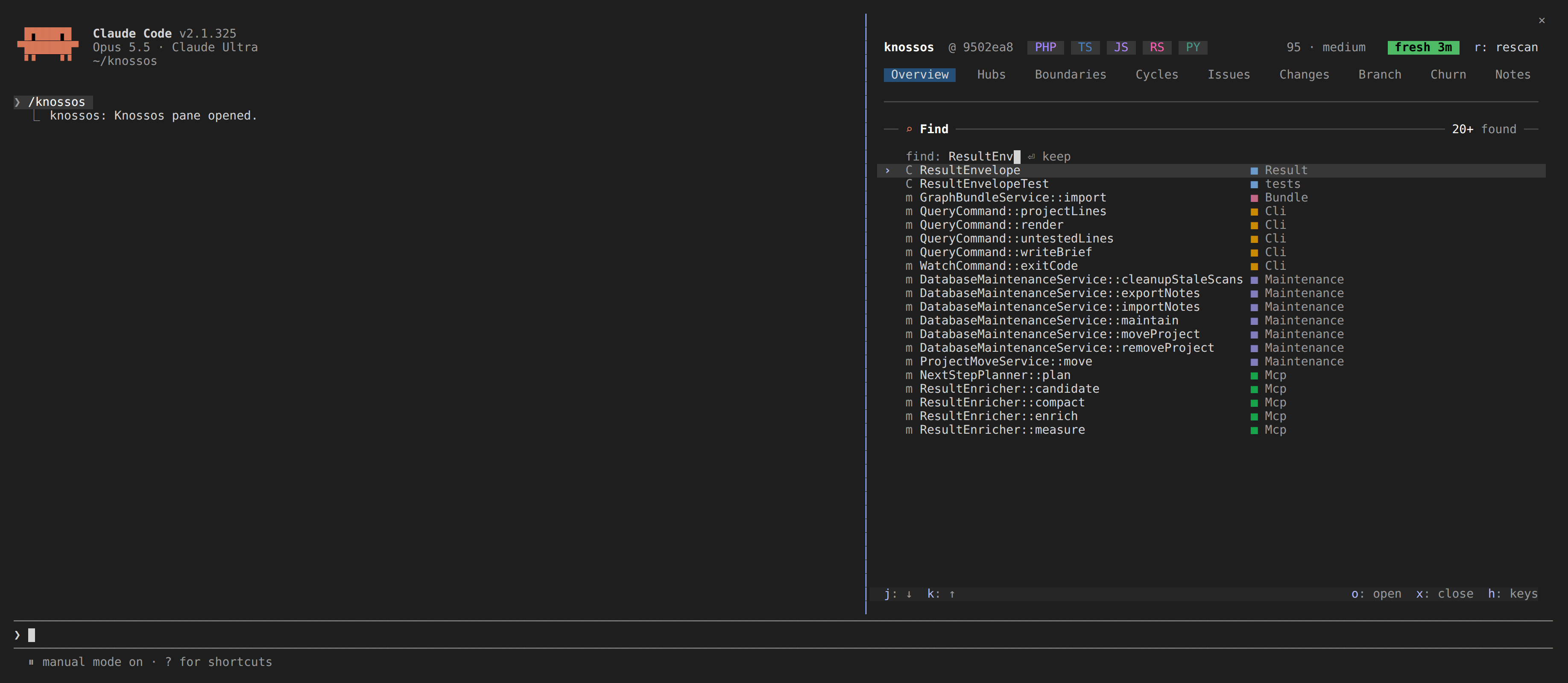
f opens the finder over any tab. Type part of a name, or a few words, and it lists first what search_architecture answers the agent: the components every word matches (in a name, an attribute, a role or a note on the component), else those most words match, and for a file's path what that file declares. After those come the other components and files whose name holds the letters in order (dsvc finds DashboardService), the closest first, a type before its members, at most twenty in all. The note says how many were found. Every kind of component is searched, routes and the kinds an enricher adds among them, except symbols from outside the project and fields, variables and parameters.
Under the matches, the finder lists the notes on names no component holds that the words match, each with who wrote it and its first line. A press on one opens the Notes tab on the missing notes, narrowed to that name.
The search runs after a short pause in the typing. Until its answer lands, the card says searching… and keeps the last matches. Knossos searches on the first 80 characters of what you type.
| key | what it does |
|---|---|
| Enter | open the marked match (the first one while you type) |
j k, o | move through the matches and open one, when the field does not hold the focus |
x | close the finder; an empty Enter does too |
A component opens as its detail, a file as the file's. Closing the finder brings the tab under it back as it was.
A route between two components
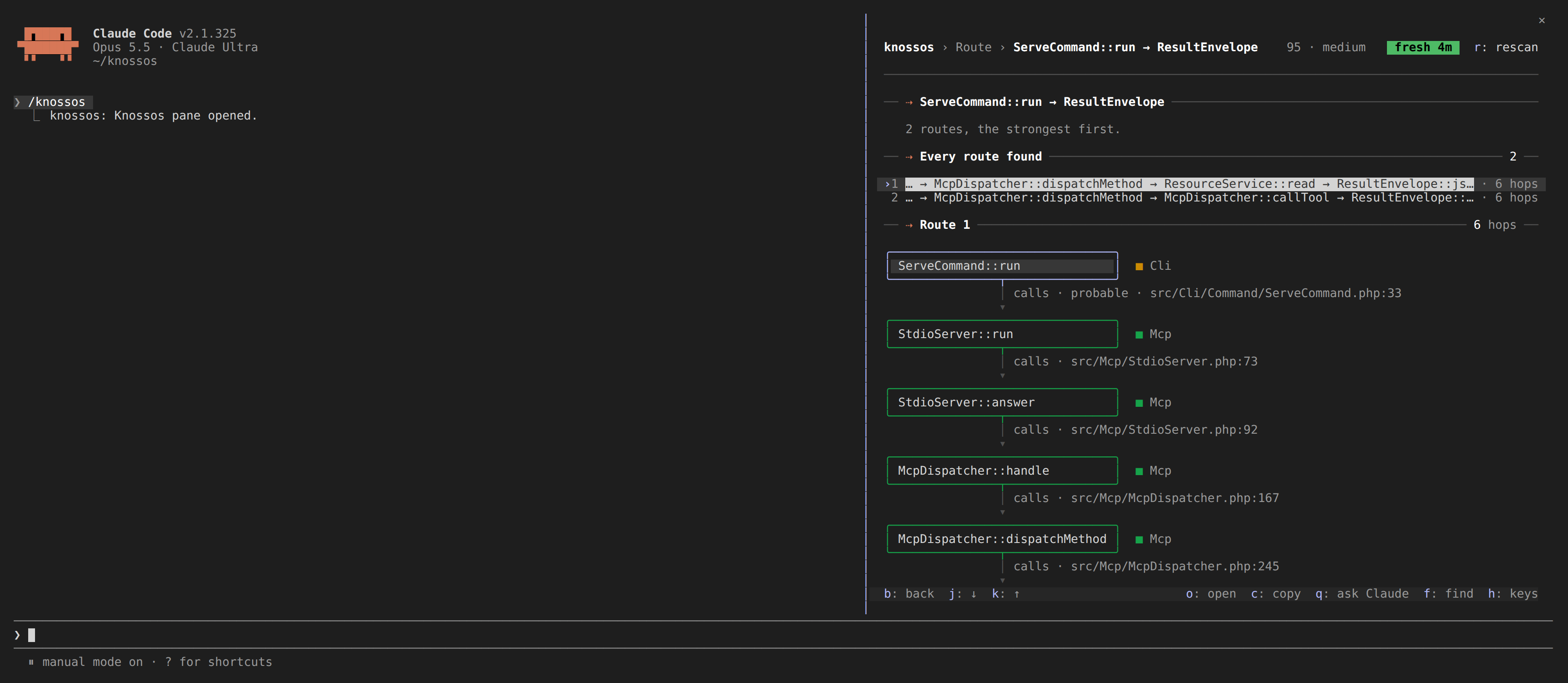
p on a component's detail starts a route. The finder opens, offering components only, and the one you open is where the route ends.
- The head card names the two ends and how the search went:
5 routes, the strongest first.When only the other direction has a route, the pane draws that one and says so in the warning colour. - Every route found lists up to five routes, at most six hops each, every one told from the last component they all share (
… → McpDispatcher::dispatchMethod → …) with its hop count. A press on one draws it. - Route 1 draws the chosen route as boxes down the pane, each framed in its boundary's colour with the boundary beside it. Each hop is an arrow labelled with its kind and the file and line it is written at, its path from the project root cut from the front where the row is short (
calls · src/Cli/ServeCommand.php:33). A hop that is only probable says so, and a hop no edge holds, a call to an interface method landing on the method that implements it, is drawn dotted and labelledimplemented_by · probable · derived.
o opens a box's component. b goes back to the detail the route began on.
Blast radius
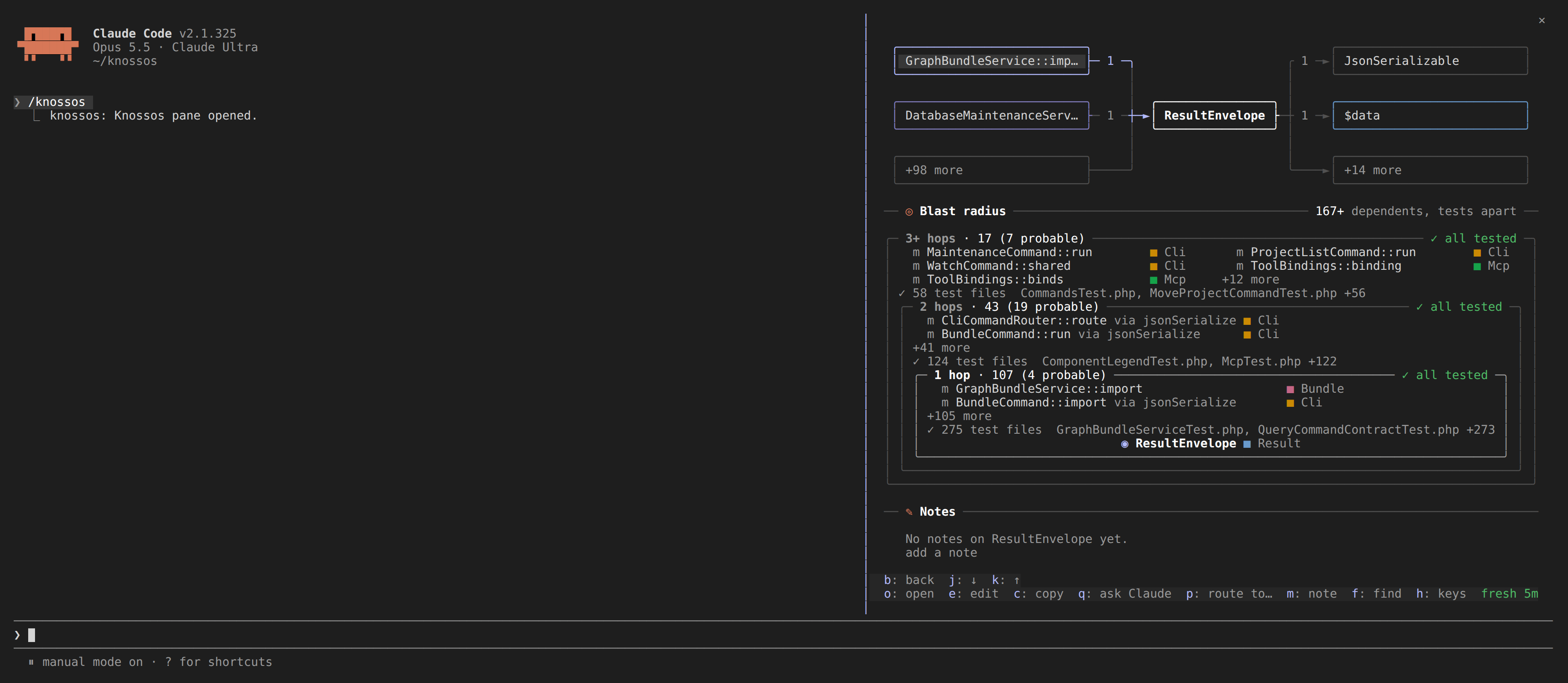
A component's detail draws its blast radius: what depends on it one hop away, two hops away, and further, as concentric frames with the furthest ring outermost and the component in the middle. The card's note says how many dependents there are in all, tests apart, since a test is no member of a ring.
Each frame's top edge carries its hop and how many components it holds (2 hops · 53, and 53 (12 probable) when some of them depend on it only probably, through an interface or a property), and on the right either ✓ all tested or how many no test reaches (▲ 1 untested, in the warning colour). The rings are impact analysis's own dependants, the answer the agent gets from impact_analysis: the walk starts from the component's members too, so a caller of a static method counts, and a framework hook (a model's newFactory) is depended on by whatever uses its class. A component counts as tested when a test depends on it, directly or through others the walk found. The tests are looked for four hops past the last ring, so a component near the edge counts as tested when its test stands a little further out, and each component no such test reaches gets a search of its own.
A call through an interface or a parent class counts for every implementation of it, constructing a class counts for its constructor, and using a class counts for its properties, as impact analysis counts them.
Tested means a static path from a test: code a test reaches only at runtime reads as untested even when coverage counts it. That covers a worker a test runs as a separate process, a script it includes by a computed path, and a reader picked from a table of class names.
Inside each frame, before the next ring in:
- its components, the untested first, each after a
▲; a boundary is named only where it differs from the component's own (http-router.php ■ composer:knossos); +14 morefor the rest;- the test files that reach the ring, nearest first (
✓ 19 test files: McpTest.php, SessionChangesServiceTest.php +17).
The rings stop at six hops, 1,500 components or two seconds, and the tests' search at ten hops; the + after the count means a bound cut the walk. Every named component is a row the marker walks, after the detail's dependencies, and o opens it as its detail. Below 44 columns the rings are plain lists.
The diff since the session began
A file opened from Changes also shows how it changed since the session began, as in the right-hand side of the Changes still. The diff is taken against the commit the project was at when the session started, so it covers the commits made during the session and the working tree alike.
- An added file shows whole as added, a deleted one whole as removed, and a file git moved as the rename, with the other path named.
- The card's note counts the lines added and removed.
- A hunk longer than 40 lines is folded with how many lines are left out. Past twelve hunks, or about 24,000 characters, the rest are counted instead. Lines longer than 200 characters are cut.
+N more linesunder a folded hunk is a button: pressing it shows the whole hunk. A hunk longer than the diff element takes (10,000 characters) shows as much as fits and ends in+N more lines: too long to draw here, e opens the file.+N more changes further down the fileis a button too: it shows the next hunks in place of these, andN earlier changesabove them goes back. The detail shows at most twelve hunks, or about 24,000 characters, at a time.- What you opened is kept while the detail shows that file. Opening the file again, or a new scan that reads its diff again, starts it folded.
- On a wide pane, beside a tab, the diff is drawn as text lines in the added and removed colours, at most four hunks of twelve lines. Its last row,
open the full diff, opens the file's detail, the same aso. Opened on its own, the diff uses Claude Code's own diff element, with line numbers and markers. - The detail scrolls over every line of the diff. Focus the pane, then use the wheel, the arrows or Page Up and Page Down; the key bar stays at the bottom. Tab and Enter reach the diff's buttons as well as a click does.
With no git repository, no commit yet, a commit that is gone, a binary file or no answer, the card says which instead of a diff.