

The pane in a browser
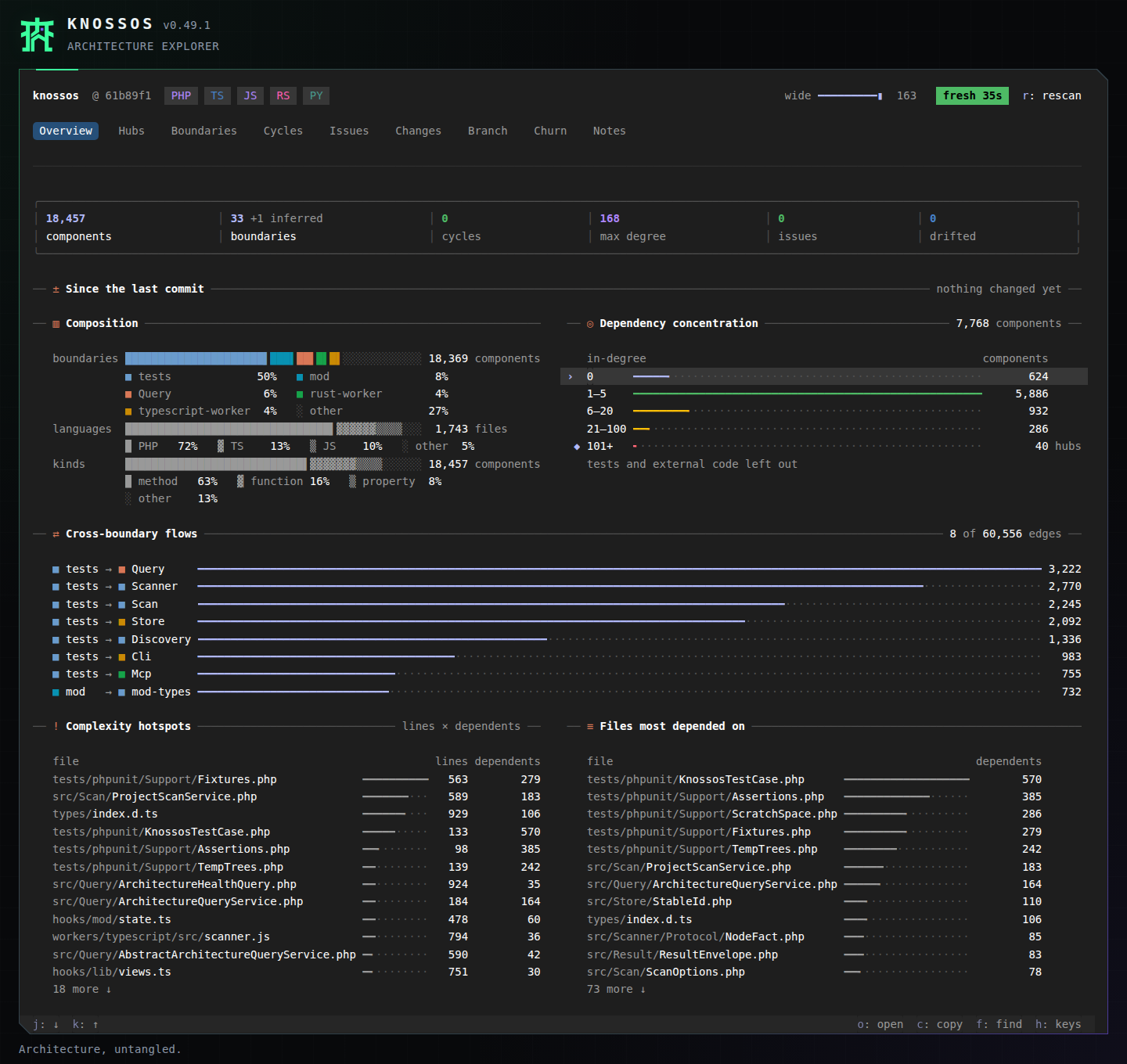
knossos web serves the Claude Code pane in a browser tab, for one project, with no Claude Code session around it. The tabs, keys, figures and colours are the pane's own: the browser draws the rows the same layout code lays out for Claude Code. Its surrounding interface and styles live in web/public, so browser presentation can change independently of the native mod.
The same pane runs fullscreen in a terminal with knossos; see the pane in a terminal. The two share one server per project, so a terminal and a browser tab open on the same project show the same pane.
Starting it
Run it in the project you want to see, or name the project:
knossos web
knossos web ~/code/shop --port=8123 --no-open
It prints the address and opens your browser on it:
Knossos web pane for /home/you/code/shop: http://127.0.0.1:41231/?t=6f0c…
Press Ctrl-C to stop it.| Option | Effect |
|---|---|
[path] | The project. The working directory when left out. |
--port=N | Listen on port N. The project's last port, or a free one, when left out. |
--no-open | Print the address only; open no browser. |
--editor=<command> | The command that opens a file from the pane. See below. |
An option it does not know stops it with its usage line, before anything starts.
Start with Overview for project counts and dependency patterns. Click the numbered tabs or use their digit keys to switch views. Press f, type part of a component's name, and press Enter to open its detail; use e on a file to open it in your editor. The Changes tab shows uncommitted work against the last commit, and Notes lets you read and maintain the project's recorded knowledge.
Opening files in your editor
A click on a file:line, or e, opens the file in your editor, as in Claude Code. The command is the one --editor names, else the KNOSSOS_EDITOR environment variable, else VS Code's code -g {file}:{line}, which Cursor and the other VS Code forks answer to too. It takes the same {file} and {line} placeholders as the plugin's editor setting:
knossos web --editor='idea --line {line} {file}'
KNOSSOS_EDITOR='zed {file}:{line}' knossos web
When the command fails, the pane copies path:line instead and says which command it ran.
It needs Node 24 or newer on PATH, which runs the pane's TypeScript as it is, with no build step. With an older Node it stops at once and says which version it found:
knossos web needs Node 24 or newer (found v22.11.0).The browser is opened with wslview, then xdg-open on Linux, open on macOS, and cmd.exe /c start on Windows and under WSL, whichever works first. When none does, open the printed address yourself.
How long it runs
It runs in the foreground, like a development server, until you press Ctrl-C or close the terminal. Closing or reloading the tab does not stop it. When it stops it ends the live watcher it started and removes its lock.
One server runs per project. A second knossos web in the same project finds the running one, prints its address, opens the browser on it and exits:
Knossos web pane for /home/you/code/shop is already running: http://127.0.0.1:41231/?t=6f0c…The lock is a file in Knossos's data directory (KNOSSOS_DATA_DIR, by default ~/.knossos), under web/, holding the server's process id and port. A lock left behind by a server that was killed is taken over by the next start: its process is gone, or its process id now belongs to another program and its address answers nothing. A server that is alive but does not answer (a terminal pane suspended with Ctrl-Z, or one that hangs) is waited on for a few seconds, with a line saying what the start waits for, and then taken over. A server that finds another holding the project closes: its terminal says so,
Another server took over the pane for /home/you/code/shop; this one stops.and a browser tab on it moves to the other server's address by itself.
A tab that was away when that happened, on a laptop that slept say, can find its way too. When the server that took over did so from one that was still running but silent (a terminal pane suspended with Ctrl-Z), it also listens on that server's old port once it is free, with only directions to its own address, for as long as it runs. It tries that port while the old pane still runs and for a minute after it ends, and never takes a port below 1024 or one another program uses: if something that is not the old pane answers there, it leaves the port alone for good. A tab whose server goes quiet without stopping reconnects after 20 to 40 seconds, and lands there the same way. A server that stops on a failure of its own still ends its watcher and removes its lock. A second Ctrl-C while it stops makes it stop at once.
The same address every time
The address stays the same from one start to the next, so a bookmark or an installed app keeps working. The project's token is kept beside the lock, in a file only you can read, made on the first start. The port is remembered too, and used again while it is free. When something else has taken it, the server starts on a free port and says the address changed:
Port 41231 is taken, so the address changed: http://127.0.0.1:43817/?t=6f0c…The new port is the one remembered from then on. With --port=N the server uses that port or does not start.
What differs from Claude Code
Everything the pane does on its own works the same: every tab, the finder, details and routes, blast radius, diffs, rescans, and your notes (add, move, adopt, confirm, remove). Notes the model wrote stay visible and can be confirmed or adopted, whichever agent wrote them.
What needs a Claude Code session is left out rather than greyed:
- "ask Claude" (
q) and anything else that writes a prompt or adds to a session. - The band above the prompt, turn briefs and the messages for the model.
- The Changes tab's column that marks this session's own edits.
A project that was never scanned offers scan it where Claude Code offers "ask Claude to scan it". It runs the same rescan, with its spinner.
The Changes tab counts from the last commit: everything not committed yet, whoever wrote it, including work from before the server started. Diffs are against HEAD. After a commit the list follows the new HEAD. Outside a git repository the tab says why it has nothing to list; before the first commit every file counts as added. The list is git's own read, so it needs no live watcher: without one it is read again every few seconds while a tab is open.
In the browser
Light and dark follow your system's colour scheme. The pane is laid out for the available workspace in characters, so a narrow tab gets the narrow layout and a wide one the wide layout. The browser adds an Aranea-inspired obsidian, mint and violet application frame, a custom kanji-inspired sigil, and a scrollable workspace. Shell labels and the version beside the title use the terminal's font size. The terminal keeps its own light and dark colours. Keyboard focus and hover states make the pane's controls easier to find.
Keys work as in Claude Code: a tab's digit, a press's letter, and the arrow keys move between the things you can press. Resting the pointer on a name that has a card shows the card. The wheel over a list longer than its card scrolls that list; anywhere else it scrolls the page. Copying uses the browser's clipboard; when the browser refuses, a toast shows the text to copy by hand.
Several tabs on one server show one pane: a press in one changes the other, and each is laid out at its own size. A tab that loses the server, because the laptop slept or the server restarted, tries again after half a second, then waits twice as long each time up to five seconds, and draws the pane as it is when it is back. Nothing you pressed while it was away is sent again.
Security
The server listens on 127.0.0.1 only. It runs Knossos commands and writes notes for whoever reaches it, so the address carries a random token, and every request without it is refused with a page that says to open the address knossos web printed in its terminal. Keep the address to yourself as you would a password. It is never put in a cookie. The token is kept in one file, the project's .host.json under web/ in the data directory, which only you can read; the lock beside it holds only the process id and port, and web/ itself is yours alone. To make a new token, delete the .host.json file and start again.
No probe and no reconnect sends the token. A start that finds the project's lock, and a server that checks the lock, ask the port without the token, and the project's server proves it holds the token by answering a fresh challenge with it. The terminal pane and the browser page do the same before every event stream they open, and send their input only while a proven stream holds. A page that is told the pane moved proves the new address before it goes there. The address you open or reload, and the files the page loads with it, go where the address points without such a check. A server from an older version of Knossos cannot answer the challenge: a new pane uses it only when the system shows the server is yours (on Linux). Otherwise it names the process, the port and the lock file, and says to stop that process if it is yours, or to remove the lock file if it is not. See Web pane token for what another user on the same machine can and cannot do, and the known limits.
The page can be installed as an app from the browser. The app opens while knossos web runs for its project; when it does not, the browser cannot reach it until you start it again.