

The pane in a terminal
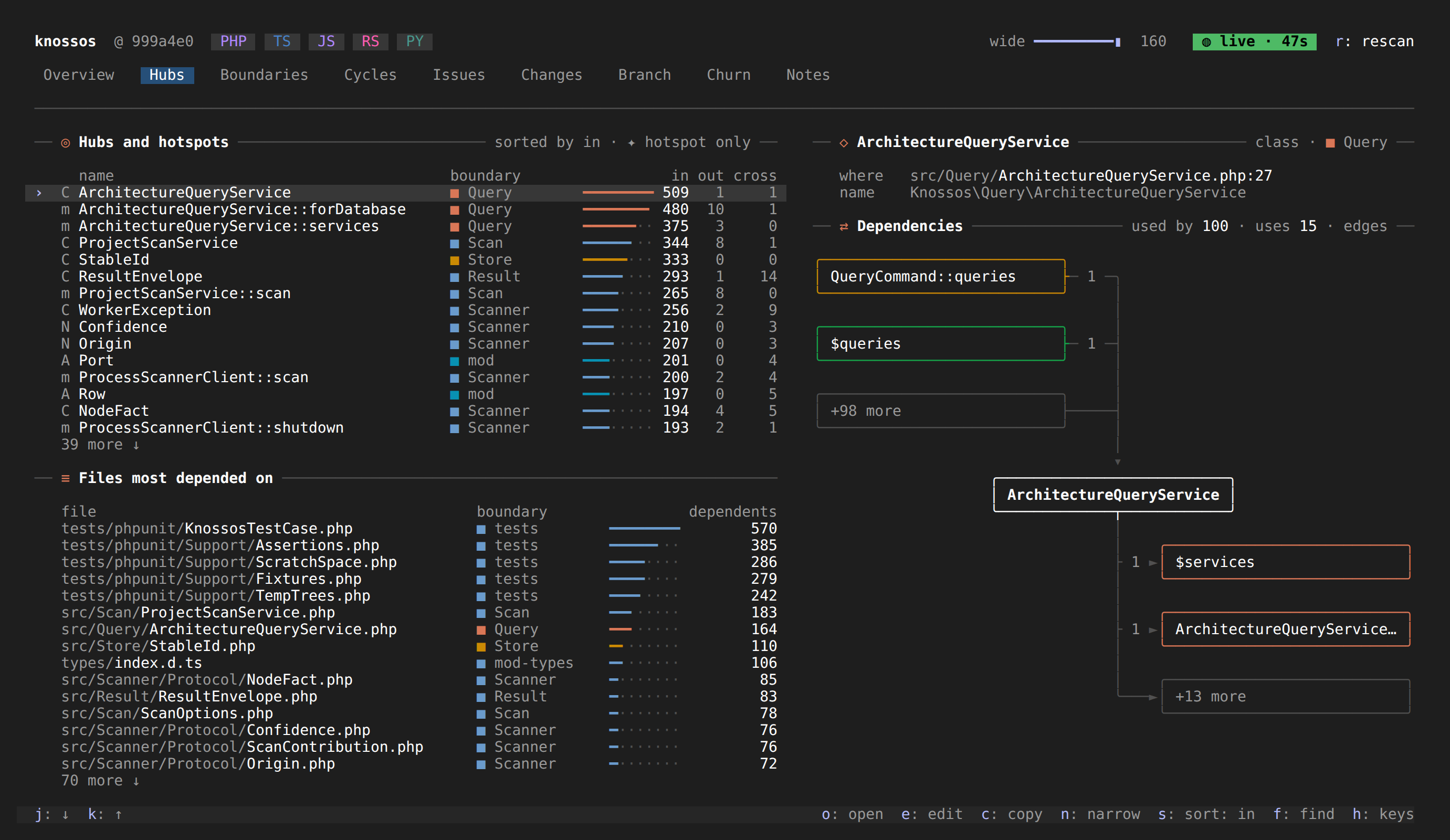
knossos with no command opens the Claude Code pane fullscreen in the terminal you are in, for one project, with no Claude Code session and no browser around it. It draws the rows the same layout code lays out for Claude Code and for the browser: the tabs, keys, figures and colours are the pane's own.
Three ways to see the same pane, and what each is for:
knossosin a terminal: a tmux split next to your work, or a fullscreen terminal of its own.knossos webin a browser tab: the web client./knossosin Claude Code: the pane beside a session, with the band and the messages for the model.
Starting it
Run it in the project you want to see, or name the project:
knossos
knossos ~/code/shop --editor='zed {file}:{line}' --theme=light| Option | Effect |
|---|---|
[path] | The project. The working directory when left out. |
--editor=<command> | The command that opens a file from the pane. See the web guide. |
--theme=dark|light | Light or dark colours. Taken from the terminal's background when left out, and dark when it does not say. |
A directory whose name is also a command (a folder called doctor) is written with a path: knossos ./doctor. A value goes after an equals sign, --theme=light, not after a space.
The pane draws on the terminal's own background, whatever colour it is. Its highlights (the marked row, hover cards, diff lines, the heat map) are shifted onto that colour, so they stay a shade lighter or darker than the terminal rather than a fixed grey. A terminal that does not report its background, or a --theme that does not fit it, gets the theme's own dark or light background over the whole pane instead, so the text stays readable.
The pane asks the terminal for its colour as it starts, and once more a second later when no answer came. An answer that arrives late, as one over a slow SSH connection can, still moves the pane onto the terminal's colour. Under tmux the answer comes from tmux, which knows the colour only once its own terminal has told it: a pane started together with tmux can ask before that, and the second question is for that case. tmux with no client attached (tmux new-session -d) never answers.
It needs a terminal for both input and output. Run from a script or with output piped, it prints the command list to stderr and exits with code 2; knossos usage prints that list to stdout. It needs Node 24 or newer on PATH, like knossos web.
Keys
The keys are the pane's: a tab's digit, a press's letter, and the arrow keys (or j and k) to move between the things you can press. A click presses, the wheel scrolls a list, and resting the pointer on a name that has a card shows the card.
| Key | Effect |
|---|---|
q | Quit, when no field has focus and the pane gives q to no press. |
Ctrl-C | Quit, always. |
Tab | Move to the next thing you can press; Shift-Tab to the previous. |
Esc | Leave the field you are typing in (the finder, a note). |
On a project that was never scanned the pane offers q: scan it, and there q starts the scan; Ctrl-C quits.
The terminal is put back as it was however it ends: q, Ctrl-C, a signal, the window closing or a crash. Started from a shell, Ctrl-Z suspends it and fg brings it back. With no shell to come back to (a tmux pane started as knossos itself, or exec knossos), nothing could resume it, so Ctrl-Z gives the terminal back for a moment and the pane draws itself again. Files open in GUI editors only: the editor command runs without a terminal, so a terminal editor such as vim cannot be used from the pane.
One server, several views
The pane is a client of the project's knossos web server. When none runs for the project, knossos starts one for as long as it runs and stops it on quit. When one runs already (a knossos web, or another terminal), it attaches to that one and leaves it running on quit. The running server opens files with its own editor, so --editor is ignored then, and the pane says so in a notice. A browser open on the same project shows the same pane: a press in one changes the other, and each is laid out at its own size.
If the server it attached to stops, the terminals attached to it notice, and one of them takes the project over while the others attach to that one. Until then the pane shows Reconnecting to the server.... The server sends a keep-alive every 10 seconds, so a server that goes quiet without stopping (one suspended with Ctrl-Z in another terminal) is noticed too: after 20 to 40 seconds without a word the pane reconnects, the same way.
A server that is there but does not answer is waited on for a few seconds, and the pane says what it waits for. The usual case is a pane suspended with Ctrl-Z in another terminal while it holds the project:
Knossos in another terminal (pid 48213) is suspended. Resume it there with fg, or wait a few seconds and this one takes over.Once the wait is over the new pane takes the project over. When the suspended pane is resumed, its server sees that another holds the project, closes, and the pane joins that server, so the two show the same pane again.
The server's log never reaches the screen. It goes to a file beside the project's lock in the data directory (web/<name>.log), and when it holds anything, knossos names the file as it exits. A message logged while the pane runs also shows as a notice naming the file. The file holds the last run that logged anything: it starts again with that run's first line.
What differs from the browser
- One toast shows at a time, where the page stacks them.
- Copying writes the terminal's clipboard sequence (OSC 52), and also uses a program for the clipboard when one is on
PATH:wl-copyunder Wayland,xclipunder X,pbcopyon macOS andclip.exeon WSL. A terminal cannot tell whether the copy arrived, so a notice shows the copied text as well.